
Tracking inventory
This document outlines usage scenarios for inventory-related endpoints in the IndicaOnline Open API. These endpoints allow you to retrieve and monitor product inventory data across offices.
Opportunity
Accurate and timely inventory tracking is essential to running an efficient cannabis retail operation. By leveraging IndicaOnline's Inventory API, businesses can retrieve detailed stock information and monitor inventory changes across multiple locations. These capabilities are useful for syncing data across platforms, optimizing fulfillment processes, and ensuring compliance with regulatory reporting.
The endpoints discussed below enable real-time access to product stock levels and provide a historical view of updates, giving you full visibility into inventory distribution.
Tracking overall Inventory
Get Inventory By Product
Use this endpoint to retrieve the current quantity of a specific product across all offices:
GET /open_api/v2.3/inventory/products/id
This enpoint may prove particularly useful if a retail operator needs to check current stock of a specific product (e.g., Sour Diesel 3.5g prepack) across all retail locations before making a decission about assigning it to a certain deal or setting up a special price.
Specify the required Body parameters:
id: The ID of the product to retrieve inventory for. This may be manually verified on IndicaOnline Web directly in the link for the product:

You may also specify the following optional parameters:
limit: Maximum number of records to return. Must be less or equal to 500.offest: Maximum number of records to skip.
And send the request. As a result, IndicaOnline Open API should return a 200 code response with the following response body:
{
  "items": [
    {
      "product_id": 123,
      "office_id": 456,
      "measurement": "weight",
      "quantity": 28.35,
      "packages": [
        {
          "id": 789,
          "quantity": 14.17
        }
      ]
    }
  ],
  "count": 1,
  "total": 1
}
In case of requesting an invalid product ID, the API will return 400 error.
In case the product was not able to be found, the API will return 404 error
Get Inventory by Office
Use this endpoint to get a full list of inventory for all products in a specific office:
https://api.indicaonline.com/open_api/v2.3/inventory/office/id
This enpoint may prove particularly useful if you want to audit the current inventory for a specific location to validate your physical stock against system records.
Specify the required Body parameters:
-
id: The ID of the office to return inventory for. This may be manually verified on IndicaOnline Web directly in the link for the office:
You may also specify the following optional parameters:
limit: Maximum number of records to return. Must be less or equal to 500.offest: Maximum number of records to skip.
And send the request. As a result, IndicaOnline Open API should return a 200 code response with the following response body:
{
  "items": [
    {
      "product_id": 789,
      "office_id": 111,
      "measurement": "unit",
      "quantity": 50,
      "packages": [
        {
          "id": 333,
          "quantity": 50
        }
      ]
    }
  ],
  "count": 1,
  "total": 1
}
In case of requesting an invalid office ID, the API will return 400 error.
In case the office was not able to be found, the API will return 404 error
Get Inventory by Last Update
Use this endpoint to pull all product inventory that has changed since a specific point in time:
https://api.indicaonline.com/open_api/v2.3/inventory/updated/timestamp
This endpoint may prove particularly useful when auditing your inventory or addressing known discrepancies, since it allows you to pass a certain timestamp to the API and get only the information about the changes committed after the specified date.
Specify the required Body parameters:
timestamp: Timestamp to filter by last update. Must follow the Unix Timestamp convention.
You may also specify the following optional parameters:
limit: Maximum number of records to return. Must be less or equal to 500.offest: Maximum number of records to skip.
And send the request. As a result, IndicaOnline Open API should return a 200 code response with the following response body:
{
  "items": [
    {
      "product_id": 321,
      "office_id": 654,
      "measurement": "unit",
      "quantity": 100,
      "packages": [
        {
          "id": 222,
          "quantity": 50
        }
      ]
    }
  ],
  "count": 1,
  "total": 1
}
These endpoints serve as the foundation for dynamic overall inventory monitoring, system synchronization, and multi-location product management within the IndicaOnline ecosystem.
Tracking inventory on a package-by-package basis
Tracking inventory on a package-by-package basis is a critical need for cannabis retailers and distributors aiming to maintain regulatory compliance, reduce loss, and ensure accurate fulfillment. Every cannabis product package carries unique identifiers and quantities, making granular visibility essential.
IndicaOnline’s Inventory API provides package-level detail for each product across offices, available exclusively to PRO Plan users.. By integrating this data, businesses can accurately monitor package depletion, prioritize older inventory (FIFO), track transfers, and reconcile stock discrepancies. This capability is particularly valuable for compliance reporting (e.g., with Metrc), real-time order accuracy, and optimizing backend logistics.
Get package by ID
Use this endpoint to retrieve detailed information about a specific inventory package, including origin, lab results, quantity, and lifecycle data:
https://api.indicaonline.com/open_api/v2.3/inventory/packages/id
This ednpoint will prove particularly useful when a compliance manager or inventory auditor needs to trace the origin and lab test results of a specific cannabis package, including its harvest and packaging dates, quantity checked in, and current availability across offices. This is especially useful when cross-checking reports with Metrc data or preparing for audits.
Specify the required Body parameters:
-
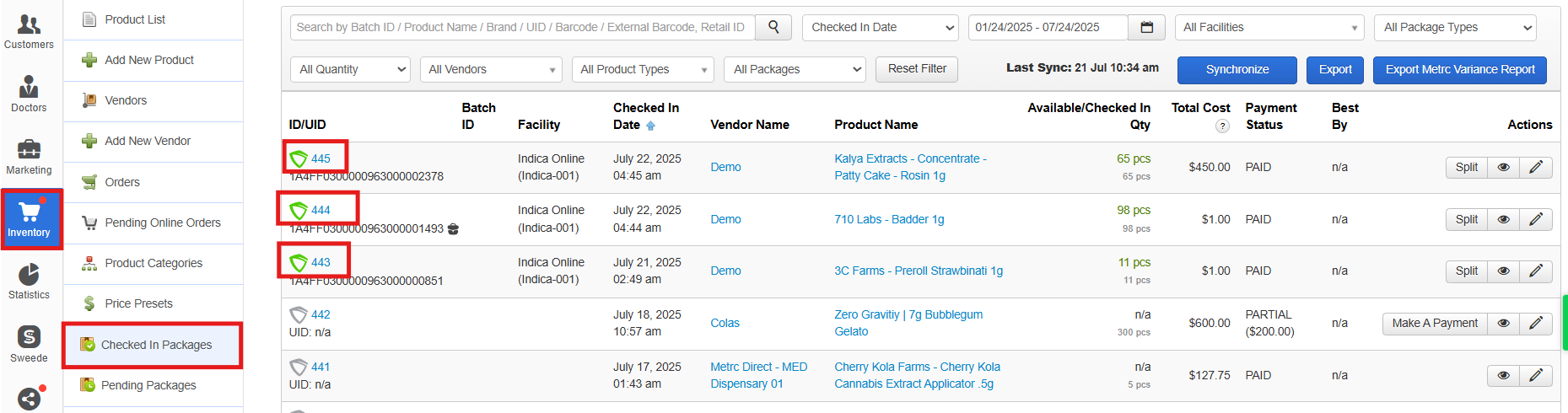
id: ID of the package to retrieve. This may be manually verified on IndicaOnline Web directly in the link for the PCQ or Metrc package:
And send the request. As a result, IndicaOnline Open API should return a 200 code response with the following response body:
{
  "id": 98765,
  "vendor": "GreenFields Collective",
  "source_uid": null,
  "batch_id": "BCH-2025-1347",
  "harvest_production_date": "2025-06-10",
  "uid": "1A40003000027E2000000151",
  "checked_in_to": 101,
  "check_in_date": "2025-06-15",
  "available_in_office": [101, 102],
  "packaged_date": "2025-06-14",
  "best_by": "2026-06-10",
  "measurement": "weight",
  "checked_in_quantity": {
    "unit": null
  },
  "available_quantity": {
    "unit": null
  },
  "tested_date": "2025-06-20",
  "lab_results": [
    {
      "id": 1,
      "measurement": 1,
      "potency": 19.85
    },
    {
      "id": 2,
      "measurement": 1,
      "potency": 0.05
    }
  ]
}
Keep in mind that the Lab Results are returned as an array of IDs corresponding to specific cannabinoids and terpenes. To convert these IDs into human-readable names, use theGet Product Lab Results endpoint.
To manually verify the output, go to IndicaOnline Web, navigate to Inventory > Checked In Packages, and click on the relevant package:
In case of requesting an invalid package ID, the API will return 400 error.
Get Packages by Product ID
Use this endpoint to retrieve all active (qty > 0) inventory packages associated with a specific product:
https://api.indicaonline.com/open_api/v2.3/inventory/products/{`id`}/packages
This enpoint will prove particularly useful for your e-commerce integrations that need to list only in-stock products for customers. By querying this endpoint, your system can determine which specific packages of a product are available and where, so only sellable inventory is shown in real-time.
Specify the required Body parameters:
-
id: ID of the product to retrieve available packages for. This may be manually verified on IndicaOnline Web directly in the link for an IndicaOnline:
And send the request. As a result, IndicaOnline Open API should return a 200 code response with the following response body:
{
  "items": [
    {
      "id": 98765,
      "vendor": "GreenFields Collective",
      "source_uid": null,
      "batch_id": "BCH-2025-1347",
      "harvest_production_date": "2025-06-10",
      "uid": "1A40003000027E2000000151",
      "checked_in_to": 101,
      "check_in_date": "2025-06-15",
      "available_in_office": [101, 102],
      "packaged_date": "2025-06-14",
      "best_by": "2026-06-10",
      "measurement": "weight",
      "checked_in_quantity": {
        "unit": null
      },
      "available_quantity": {
        "unit": null
      },
      "tested_date": "2025-06-20",
      "lab_results": [
        {
          "id": 1,
          "measurement": 1,
          "potency": 19.85
        }
      ]
    }
  ],
  "count": 1,
  "total": 1
}
Keep in mind that the Lab Results are returned as an array of IDs corresponding to specific cannabinoids and terpenes. To convert these IDs into human-readable names, use theGet Product Lab Results endpoint.
In case of requesting an invalid package ID, the API will return 400 error.
Updated about 1 year ago